


Recreation.gov
4.89.71K Reviews
App Specs
- Version
- 2.2.59
- Updated On
- License
- Free
- Downloads
- 1,000,000+
- Developer
- Booz Allen Hamilton, Inc.
- Categories
- Travel & Local
- Platform
- Android, iOS
Screenshots
 Analysis by AppCompare
I think of Recreation.gov less as a wilderness guide and more as a planning desk I can carry with me. It is a free travel and local app from Booz Allen Hamilton, Inc., aimed at finding and arranging visits to outdoor recreation sites in the United States. That distinction matters: it can help me narrow down where to go and organize a reservation, but I would still prepare separately for the realities of a trip beyond reliable cell coverage.
When a connection matters most
The app is most useful while I have a dependable internet connection and can compare options at a comfortable pace. Searching for a destination, checking its details, and handling a reservation are the kinds of tasks I prefer to do before I leave home. That way, I can make decisions on a larger screen if I want, then use my phone for the parts that suit a mobile visit.
I would not treat a loaded page as a guarantee that every detail will remain available once I am out of range. Outdoor trips often pass through places where coverage changes, and a phone that cannot reach the network may not be able to refresh current information. I make a habit of reviewing the practical details before departure and keeping any essential reservation information somewhere I can reach without relying on a live connection.
Useful on the move, but not a substitute for preparation
For a spontaneous day trip, a phone-friendly way to look through recreation options can be much easier than juggling several browser tabs. I can start with the area I have in mind, compare the available activities, and decide whether a visit fits the day. For a more involved outing, I would use the app as one part of the plan rather than my only source of directions or safety guidance.
A realistic example is a family deciding on a weekend campsite after work. I would use the app while connected to compare possible locations and sort out the reservation, then check the route, arrival plan, and relevant site rules before setting off. If the drive crosses a patchy-signal area, I would not wait until the last turn to look up information I need. That small bit of preparation makes a mobile booking tool more useful without assuming it can solve every problem on the road.
What to do when the network lets you down
Connectivity is the main practical trade-off I would keep in mind. If a page loads slowly or a request fails, I would first move to a stronger connection and retry before repeating a reservation action. Repeating a payment or booking step without checking its status can create confusion, so I would confirm whether the first attempt went through before starting again.
I also would not use this app as my sole emergency resource. A recreation reservation service and a dependable safety plan are different things. Before heading into a remote area, I would tell someone where I am going, check local conditions through suitable sources, and make sure I have the equipment and directions the trip requires. The app can support preparation; it cannot make weak coverage disappear.
Worth Reading Before You Choose

EA SPORTS FC Mobile 26 Is a Bigger Football Game, but It Takes Time

Flipboard Shows What News Apps Must Do Beyond the Feed

Switching to Android Auto Means Rethinking Your Driving Routine

Google Calendar Makes a Crowded Week Easier to Manage

Ludo King Makes the Most of the Minutes Between Plans

Baby Panda World Brings Quick Play to Modern Phones, but Its Game Library Feels Busy
Keeping phone use sensible outdoors
For data-conscious use, I would do the planning that requires repeated searches while on Wi-Fi, then avoid unnecessary refreshing once I am traveling. This is especially sensible on a long drive or in an area where a weak signal can make simple browsing frustrating. I would also keep my phone charged and save key trip details in a form I can consult without reopening the app.
That approach suits the way I like to travel: use the phone to organize the parts that benefit from a clear search and reservation process, then pay attention to the place once I arrive. If I am choosing a remote outing mainly for a digital-free break, I would finish the app work beforehand rather than expecting the screen to remain a reliable companion on the trail.
Discovering the Great Outdoors
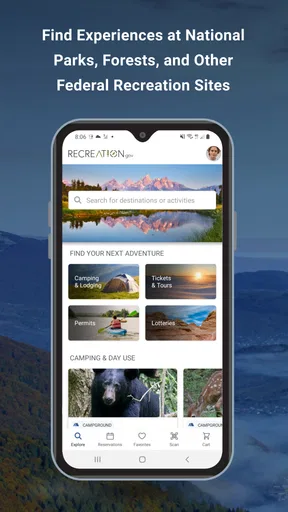
As soon as you open Recreation.gov, you’re greeted with a user-friendly interface that invites you to explore. The app is designed to help you find everything from camping spots and hiking trails to fishing locations and guided tours. It’s like a treasure map, leading you to some of the most beautiful and serene spots nature has to offer.
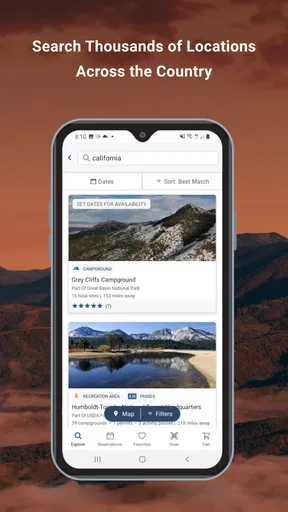
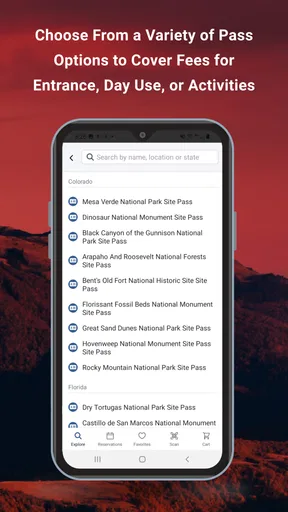
One of the standout features is the search functionality. You can filter by activity, location, and even amenities. Want a campsite with a lake view? No problem. Looking for a trail that’s dog-friendly? You got it. The app has you covered with its extensive database of over 3,600 facilities and activities across federal lands.
Planning Made Easy
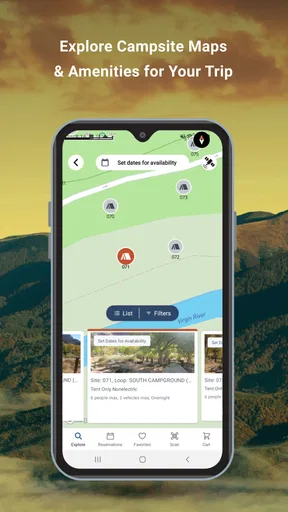
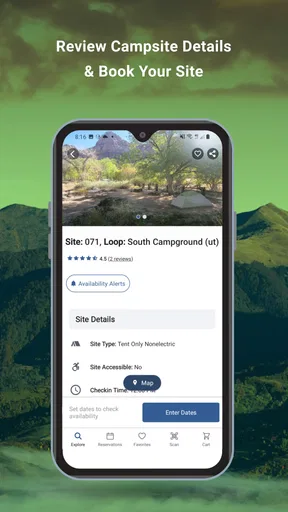
Planning an outdoor adventure can be daunting, but Recreation.gov makes it a breeze. With detailed descriptions, maps, and photos, you can get a sneak peek of your destination before you even pack your bags. This level of detail helps you plan effectively and ensures there are no surprises when you arrive.
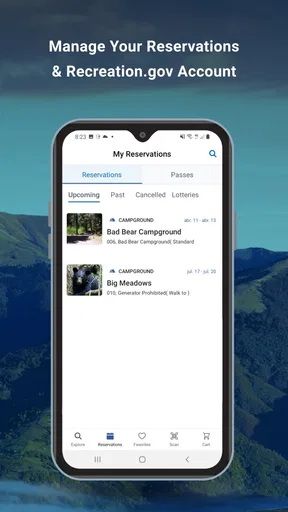
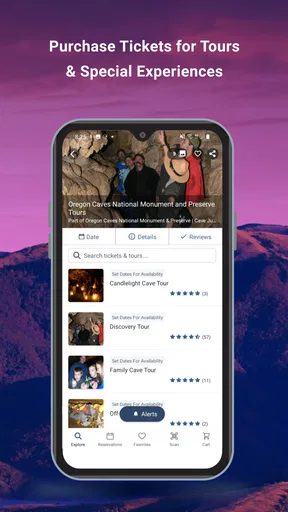
Booking a spot is as easy as a few taps on your screen. The app allows you to reserve campsites, tours, and permits directly. Plus, you can keep all your reservations in one place, making it super easy to manage your trips. No more scrambling through emails to find your booking details!
Choosing the right tool for the trip
The app’s broad search is useful when I know the kind of outing I want but have not settled on a destination. I can compare recreation options in an area instead of starting with a particular campground’s website. That makes it a practical first stop for discovering places and handling reservations connected with federal lands.
It is not necessarily the best tool for every part of outdoor planning. For turn-by-turn driving, I would use a dedicated navigation app; for trail conditions or local expertise, I would check resources focused on the specific area. The advantage here is bringing discovery and reservation tasks together, not replacing every map, guidebook, or land manager’s update.
Small planning choices that pay off
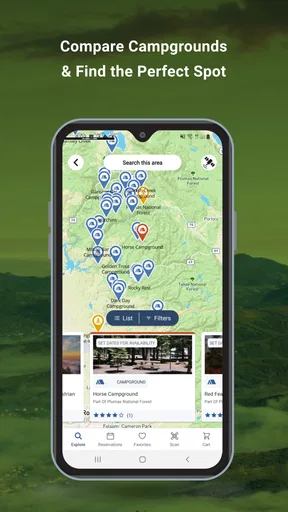
When comparing campsites, I would look beyond the scenic appeal of a listing and check the amenities and practical description against the needs of my group. A site that suits a tent trip may not work for an RV, and a place that looks convenient on a map may still require a different arrival plan. Using filters to make a shortlist first is less tiring than opening every option one by one.
I would also separate “finding a place” from “being ready to go.” A reservation is only one part of the plan; it does not tell me what to pack, how long the drive will take, or whether a route suits my vehicle. I find it helpful to make a quick checklist after booking, using the trip details to identify what I still need to confirm through other sources.
Planning Made Easy
Planning an outdoor adventure can be daunting, but Recreation.gov makes it a breeze. With detailed descriptions, maps, and photos, you can get a sneak peek of your destination before you even pack your bags. This level of detail helps you plan effectively and ensures there are no surprises when you arrive.
Booking a spot is as easy as a few taps on your screen. The app allows you to reserve campsites, tours, and permits directly. Plus, you can keep all your reservations in one place, making it super easy to manage your trips. No more scrambling through emails to find your booking details!
Stay Informed and Safe
One of the things I love about Recreation.gov is its commitment to ensuring your safety. The app provides real-time alerts about weather conditions, road closures, and any other important updates related to your destination. It’s like having a safety net that keeps you informed so you can enjoy your trip with peace of mind.
Additionally, the app includes tips and guidelines for outdoor safety, which is especially helpful if you’re venturing into unfamiliar terrain. Whether you’re a seasoned adventurer or a newbie, these insights are invaluable.
How it fits different travelers
I would recommend it most to people who regularly camp, travel in an RV, or plan visits to recreation sites and want one place to explore options and manage bookings. It can also help a newer camper turn a vague idea—“somewhere outdoors this weekend”—into a more focused search. A family can compare the practical fit of different outings, while a solo traveler can use the same planning path without needing a separate booking process for every idea.
On the other hand, someone who only wants a general hiking map may be happier with a mapping app built around trails and navigation. If your plans center on private campgrounds or a destination outside the app’s scope, a specialized booking service or the site operator’s own information may be a better match. I see Recreation.gov as particularly useful when its recreation listings and reservations line up with the trip, not as a universal directory of every outdoor place.
A few details worth checking before you leave
Before relying on a reservation for a tightly timed itinerary, I would verify the details in the app and make sure I understand the arrival requirements. For a tour or permit, timing can matter just as much as the destination, so I would put the relevant time and confirmation information somewhere easy to retrieve. That is a simple habit, but it helps prevent a phone search from becoming the first task at a busy trailhead or visitor area.
I would also be careful not to confuse attractive photos with a complete picture of conditions. Images help me imagine a place, but they cannot tell me whether the weather, road access, or current site situation suits my plans. The app is a useful way to shortlist and reserve; I still treat trip-specific checks as their own step, especially when traveling with children, an RV, or anyone who needs particular facilities.
A Community of Adventurers
What’s an adventure without a little storytelling? Recreation.gov taps into the community spirit by allowing users to share reviews and photos of their trips. This community-driven aspect not only helps you get a real feel for the place but also connects you with fellow outdoor enthusiasts. It’s like swapping stories around a virtual campfire!
And if you’re feeling a bit indecisive, browsing through others’ experiences might just inspire your next trip. Sometimes, seeing someone else’s adventure sparks the wanderlust in you, and this app is great at nudging you in the right direction.
What the crowd can—and cannot—tell you
I find traveler reviews most useful as prompts for better questions, rather than as guarantees. A photo or comment can draw my attention to a feature I had not considered, but another visitor’s experience may reflect a different season, vehicle, or tolerance for crowds. I would use those impressions to guide what I check next, not to assume the same conditions will greet me.
The app has a 4.8 average from around 94,000 ratings, and it has passed a million installs. Those figures suggest that many people find it useful, but popularity does not remove the need to judge whether a particular listing suits your trip. It is free, rated for Everyone, and its current version is 2.2.46; the app first appeared on August 23, 2019, and requires iOS 11 or later.
Who may want a different approach
If you prefer to make plans only after reaching a destination, a reservation-focused app may feel like extra work, particularly when you are not looking for a bookable site or activity. Likewise, someone who wants a fully dependable offline guide should not assume that a connected service will provide every detail without signal. I would plan with it before departure and pair it with suitable maps and local information for the actual outing.
For people who do want to reserve ahead, the main question is whether the places they are considering appear in the app and whether its booking workflow matches their needs. I would search broadly first, then inspect the most promising options rather than expecting one search to settle every choice. That keeps the app in its strongest role: helping turn outdoor possibilities into an organized plan.
The Final Verdict
All in all, Recreation.gov is a fantastic tool for anyone looking to explore the great outdoors. It seamlessly combines convenience, safety, and community, all while guiding you to some of the most breathtaking spots in the country. Whether you’re planning a solo hike or a family camping trip, this app is your trusty companion.
So, next time you’re itching for an adventure, whip out your phone and let Recreation.gov lead the way. Trust me, your next great escape is just a few taps away!
Pros
- User-friendly interface for easy navigation.
- Comprehensive information on parks and sites.
- Real-time availability updates.
- Secure
- straightforward booking process.
- Offers mobile alerts for reservation changes.
Cons
- Limited offline functionality.
- Occasional app crashes reported.
- Notifications can be delayed.
- Some features require internet access.
- Limited international site information.
FAQs for Recreation.gov
What is Recreation.gov and what can I do with it?
Recreation.gov is a comprehensive platform that allows users to discover and book a variety of outdoor activities and camping sites across the United States. The app provides information on national parks, forests, and other federal lands, offering services like booking campsites, obtaining permits, and exploring recreational activities. It's a must-have for outdoor enthusiasts looking to plan their adventures.
How do I create an account on Recreation.gov?
Creating an account on Recreation.gov is straightforward. Simply download the app, click on the 'Sign Up' option, and provide your email address and a secure password. You’ll also need to provide some basic personal information. Once registered, you'll have access to booking services, personalized recommendations, and reservation management.
Are there any fees associated with using Recreation.gov?
While downloading and using the Recreation.gov app is free, some activities and services may require fees. For example, booking campsites, obtaining certain permits, or making reservations for guided tours might involve charges. These fees vary depending on the specific activity and location, so it’s advisable to check the details for each booking.
Can I cancel or modify reservations made through Recreation.gov?
Yes, you can cancel or modify reservations directly through the Recreation.gov app. To do this, go to your 'Reservations' section and select the booking you wish to change. Keep in mind that cancellation policies and fees may vary based on the specific site or activity, so always review the terms associated with your reservation.
Is Recreation.gov available offline?
The Recreation.gov app requires an internet connection to access most of its features, such as searching for locations, booking reservations, and updating account information. However, you can save your reservation details offline so you can access them without a network connection, which is particularly useful in remote areas with limited service.


